GTD the Trello way revisited
How to apply GTD rules revisited
What is GTD?
GTD is a method of handling the overflow of tasks. It was introduced by David Allen in his book Getting Things Done: The Art of Stress-Free Productivity. If you would rather read a quick description then head to Erlend Hamberg Blog and cut that down to 15 minutes.
GTD requires you to write each idea you have and put it into what is referred to as an inbox. Afterwards you go through that list and process it.
By default GTD requires the creation of a few lists
- Inbox: All your ideas/tasks/thoughts/dreams need to be entered here no matter how silly it may seem.
- Next Actions: These are the selected items that you intend to do in the prospective period you chose for the Processing (Usually weekly).
- Waiting: Things that you will need to wait for others to finish before executing them and move them to Next Action if needed.
- Projects: Things that will require multiple tasks to be executed and we need to define those
- Someday/Maybe : Things that you may do one day , but its not urgent.
The other parameter that is included is the context of doing the task; this is usually Home / Work.
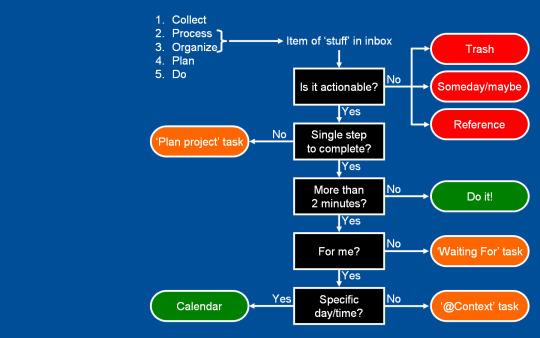
Processing your inbox list is explained clearly using the below diagram
What is Trello?
As described on their website, “A Trello board is a list of lists, filled with cards, used by you and your team. It’s a lot more than that, though. Trello has everything you need to organize projects of any size.”. This is their tourhttps://trello.com/tour but basically you can create boards like
- Personal board
- Business board.
- Travel board,
- Etc.
Each board gets as many lists as you want, and you can add as many cards to any list. Cards are listed with high priority at the top.
Sample lists
- Ideas.
- To Do.
- Doing.
- Done.
- Etc.
Trello allows flexibility around your ideas and how you execute them. There are unlimited ways to get your board designed and used. Take a look at their Inspiration page it is actually very inspiring . These implementations are amazingly helpful.
Current GTD Trello implementations do not go well with the flexibility of the app. The implementation is as follows:
Based on GTD execution per board https://joshuaearl.com/rocking-gtd-with-trello/structure, which moves cards around the board to achieve goals. It’s good but forces us to move cards from the Board they belong to, to a GTD specific board, which from my perspective is less than optimal.
The other way https://gsferreira.com/archive/2014/09/how-to-implement-getting-things-done-with-trello/ relies on single board GTD List formatting which limits the flexibility that Trello offers
Getting GTD done using Trello
Instead of creating boards or lists that represent the pillars of GTD I decided to go with Labels. You have all the flexibility of Trello intact. Each board should have the following Labels:
You can see I added a few more labels that are not related to GTD approach, I will explain here how that should be used but let me define each pillar.
Boards & Lists
Feel free to use any board you want with any structure that fits what you are trying to achieve . Pick any https://trello.com/inspiration or your own ideas of organizing your board. Just make sure that the labels defined on the board are like the above list.
How to handle the inbox list required in GTD?
All my new ideas and tasks are entered in an inbox list. Then when I process the inbox I label cards that require action as NextAction and move them to the appropriate list within that board.
How to Process your inbox? If a card does not have a label that means it needs to be processed. And this is how you should do it.
Next Actions: This Label indicates the task must be completed before our next processing period (Usually a week).
Waiting: Cards that you will need to wait for others or for time to pass before moving them to Next Action if needed.
Projects: Cards that need more than one task to get it done.
Maybe: Things that you may want to do someday, but are not urgent.
Read/Review: Cards that involve reading or reviewing more than doing a task as expected within Trello analogy.
Quick: Tasks that can be done quickly whenever you have some time.
Home , Office : Cards that require being at a specific location, otherwise no need to select a context.
Where is my Trello GTD dashboard?
Trello search is the best way to help us navigate GTD across many boards. If you are a Trello Gold member then you can save those searches, but actually that is easy either way.
Processing Phase
To process all cards labeled “Action” you can search for label:Action.
-label:{any character} Which should return any non-labeled card across all boards.
Getting Things Done Phase
Search for Cards labeled Next action like this
label:”Next Action” which should show all the tasks we marked as Next Action.
Trello explains what you can do with their search from here https://trello.com/search?q=
After you get something done, move the card to the Done list of your board (Or whatever you use) then archive it.
To measure your progress you can search for -is:open (which returns cards that have been archived).
I will continue posting my shortcuts. But I hope that you find this as a good starting point for you.
Now Go Get Things Done